Clients
Apps for connecting to the server:
v2rayNG (Android),
NekoBox / nekoray
(Windows, Linux),
Hiddify (all platforms). Use a recent version: REALITY
and XHTTP need it. For hysteria2 use Hiddify, NekoBox or the official
hysteria client; for turnable — the
Turnable client.
Danger
A client app sees all your traffic. Install apps only from their official pages.
Links and QR codes
xvei links                      # all links
xvei qr vless_reality           # QR code to scan with a phone
xvei client-config vless_tls    # full Xray config for apps that need a file
Inbounds with several clients get a link per client;
xvei qr <tag> <client> picks one. Menu: xvei → 6) Links / QR codes.
Sites of your own country directly from the phone
Opening local sites (banks, government services) through the VPN is slow and sometimes refused. The client app can send them directly through your ordinary internet. This happens on the phone, not on the server.
The config from xvei client-config already has such rules for the chosen
template. If you import only a link, add them in the app. For Russia:
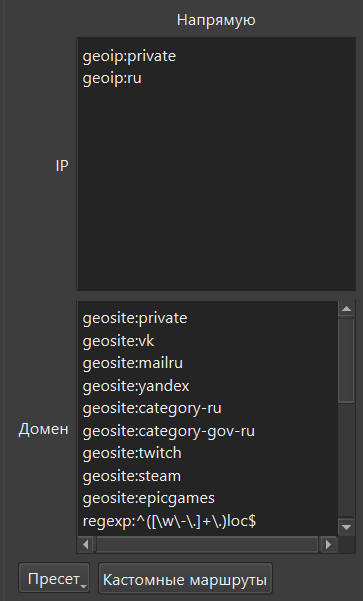
- IP:
geoip:private,geoip:ru - Domains:
geosite:private,geosite:category-ru,geosite:category-gov-ru
NekoBox step by step
-
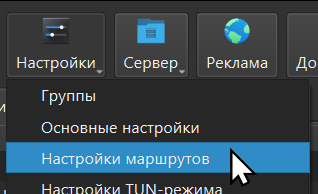
Settings → Routing settings.
-
The Basic routes tab.

-
Put the lists above into the Direct column.
-
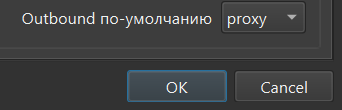
Leave Default outbound as
proxyand press OK.